Set up
Send us your photos and videos
How to send photos and videos from your phone, what to send, and how to take good photos.
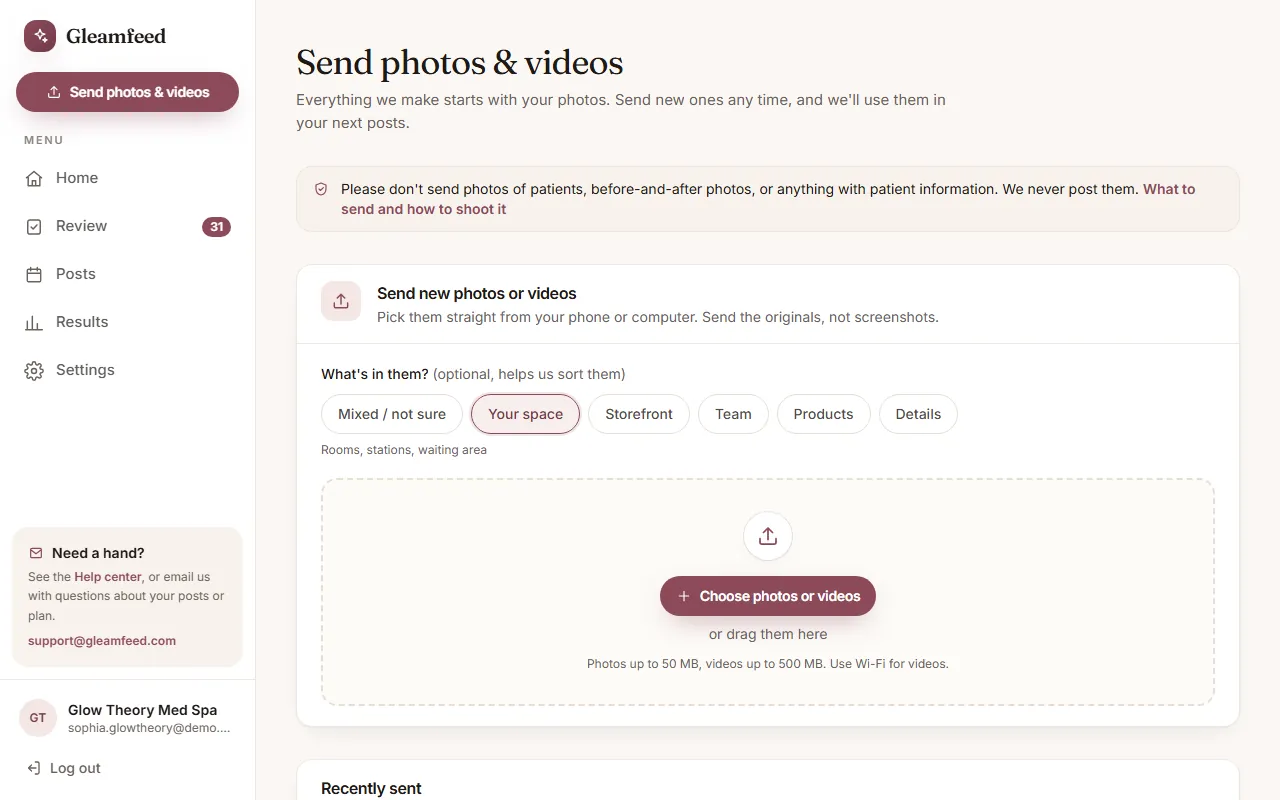
Everything we make starts with your own photos. Good photos make good posts, and a phone is all you need.
How to send them
- Log in and click Send photos & videos. It's on your Home page, and in the menu on a computer.
- Optional: pick what's in them, for example Your space, Team or Products. It helps us sort them. Not sure? Leave it on Mixed / not sure.
- Click Choose photos or videos and pick them from your phone or computer. You can choose many at once, or drag them in on a computer.
- Keep the page open until every file says Sent. If one didn't go through, tap Retry.
Photos can be up to 50 MB each and videos up to 500 MB, so your phone's originals are fine. Use Wi-Fi for videos. Everything you send is listed under Recently sent. Sent something by mistake? Email support@gleamfeed.com and we'll delete it.
You can also share a Google Drive, iCloud or Dropbox link, or email the photos to support@gleamfeed.com as attachments at “Actual Size”. Please don't send them through Messenger, WhatsApp or Instagram: those apps shrink photos and make them blurry.
What to send
- Med spas: about 30 photos to start. Your treatment rooms from 2 or 3 angles, your products, one portrait of each provider, your storefront or reception, and a few details.
- Nail salons: 20 or more finished sets in daylight, plus your space and team.
Tips for great photos
- Shoot in daylight near a window, with the room lights on and the flash off.
- Wipe the lens first.
- Hold the phone upright and steady, and tap the screen to focus.
- Don't zoom; step closer instead.
- Tidy the background.
Short video clips (optional)
- Film vertically, in good light, holding steady for 5 to 10 seconds per shot.
- Send the original files, not screen recordings. Short clips are best: under a minute each, up to 20 clips a month.
- Nail salons: film the process from above, ask your client first, and keep faces out of the shot.
- Med spas: please don't film clients or patients.
What we never use
- Med spas: patient photos, before-and-after photos, or any patient information. Please don't send them.
- Nail salons: clients' hands only with their permission, and never their faces.
We check every photo
If a photo is blurry, too dark, overexposed or too small, we'll ask you for a new one instead of “fixing” it with AI. Each video also gets a cover image made from your photos; you'll see it when you review (see Video cover images).
Still have a question?
Email us and a real person will help.