Every month
Review and approve your posts
Approve posts, ask for changes, and what happens after you approve.
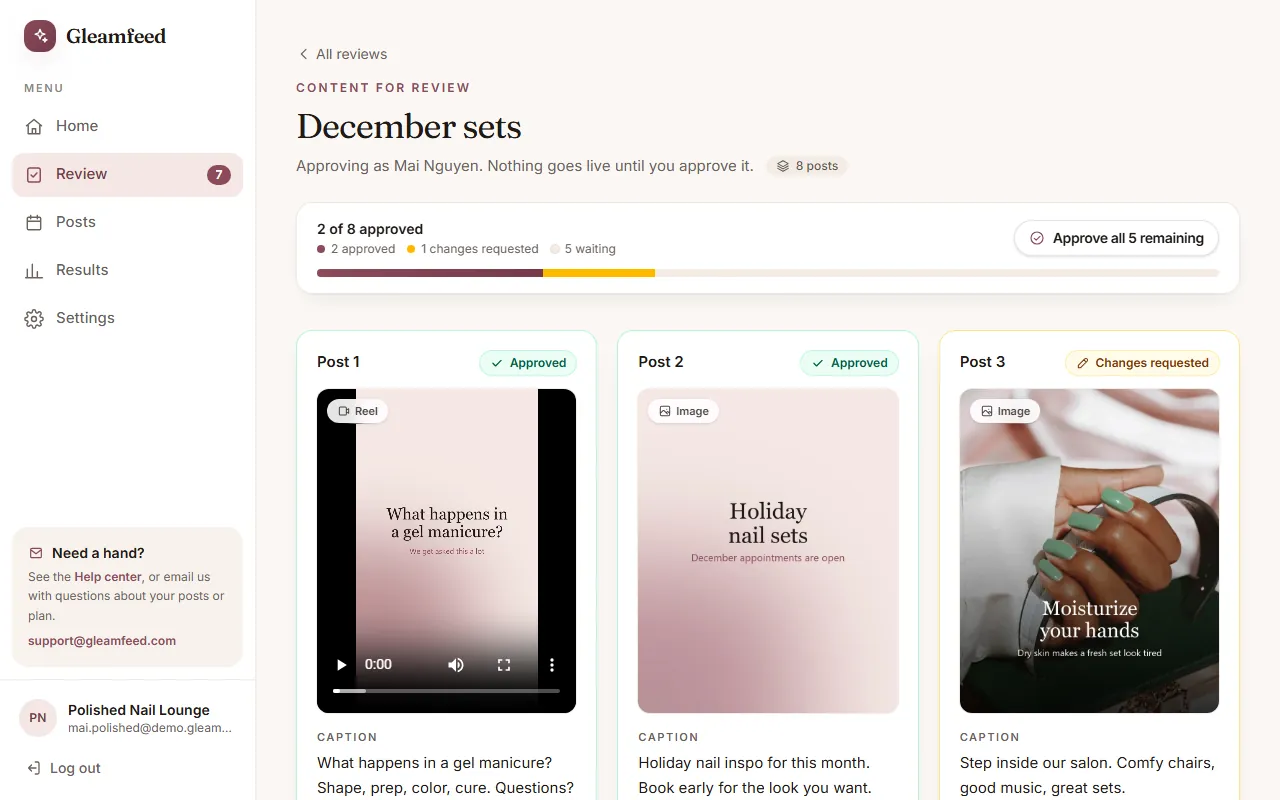
When a new batch is ready, we let you know and it appears under Review. The number on the Review tab shows how many posts and review replies are waiting for you.
Review each post
Each post shows the video (Reel) or image and its caption. Videos also show their Cover image: what people see before the video plays. You approve the cover together with the video (see Video cover images).
- Happy with it? Click Approve.
- Want something changed? Click Request changes, tell us what to change, and click Send note. We send the updated post back to you to approve.
- Changed your mind? Click Change my answer.
- Looked at everything? Approve all approves every post that is still waiting. Posts you asked us to change stay as they are.
Reviewing from an email link
We may also email you a private review link, so you can review without logging in. Enter your name once; it's needed to approve. The link works for 30 days unless we tell you otherwise.
What we record
Each decision is saved with your name, the date and the exact version you saw: the caption, the video or image, and the cover. If we update a post after you opened the page, you'll be asked to reload so you always approve what you see.
After you approve
We schedule your approved posts, usually within a few days, at your local time. You'll see them under Posts. Once a post is scheduled, you can't change your answer on the page; email us at support@gleamfeed.com and we'll take care of it.
Good to know
Nothing goes live until you approve it.
Still have a question?
Email us and a real person will help.