Every month
Reply to your Google reviews
Approve the replies we draft for your new reviews, and the rules that keep them safe.
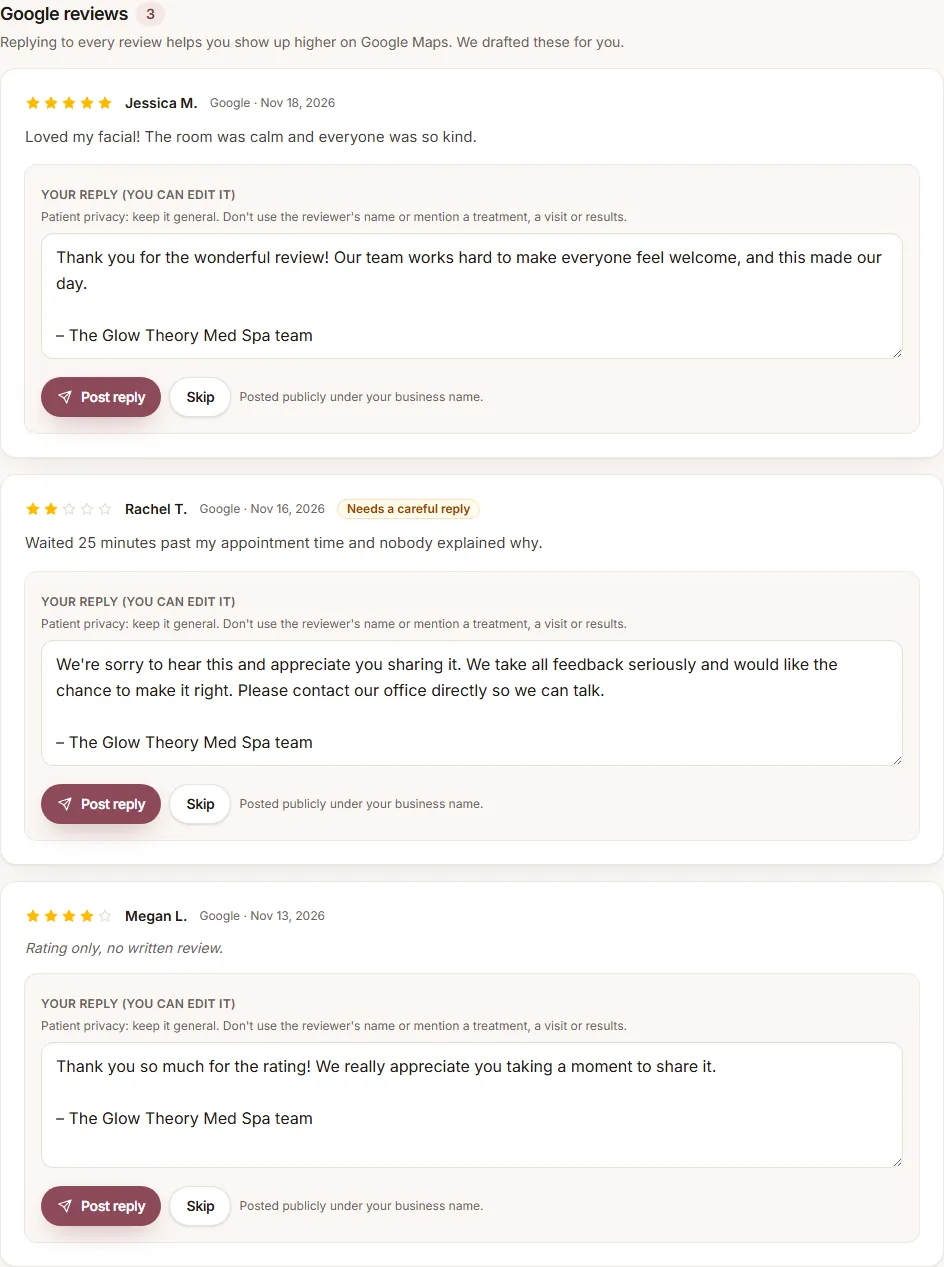
Replying to every review helps you show up higher on Google Maps, and it's included in every plan. When you get a new review on your connected Google Business Profile (or a Facebook recommendation), we draft a reply for you. You'll find it under Review, in the Google reviews section.
Approve a reply
- Read the review and our draft. Edit the reply if you like.
- Click Post reply to post it publicly under your business name, or Skip if you'd rather not reply.
Nothing is posted until you click Post reply. Reviews of 3 stars or fewer are marked Needs a careful reply.
The rules for public replies
- No links, email addresses or phone numbers.
- No promises or medical claims.
- Med spas, for patient privacy: don't use the reviewer's name, and don't mention a treatment, a visit or results. A reply should never confirm that someone is a patient.
If a reply breaks a rule, the box tells you which word to change before it can be posted.
Getting more reviews
Use your review QR code and link under Results. Ask every client: Google doesn't allow asking only happy ones, and we never offer anything in exchange for reviews.
Still have a question?
Email us and a real person will help.