Every month
Results, monthly reports and your links
Your monthly numbers, your tracked booking link, and a QR code that asks for Google reviews.
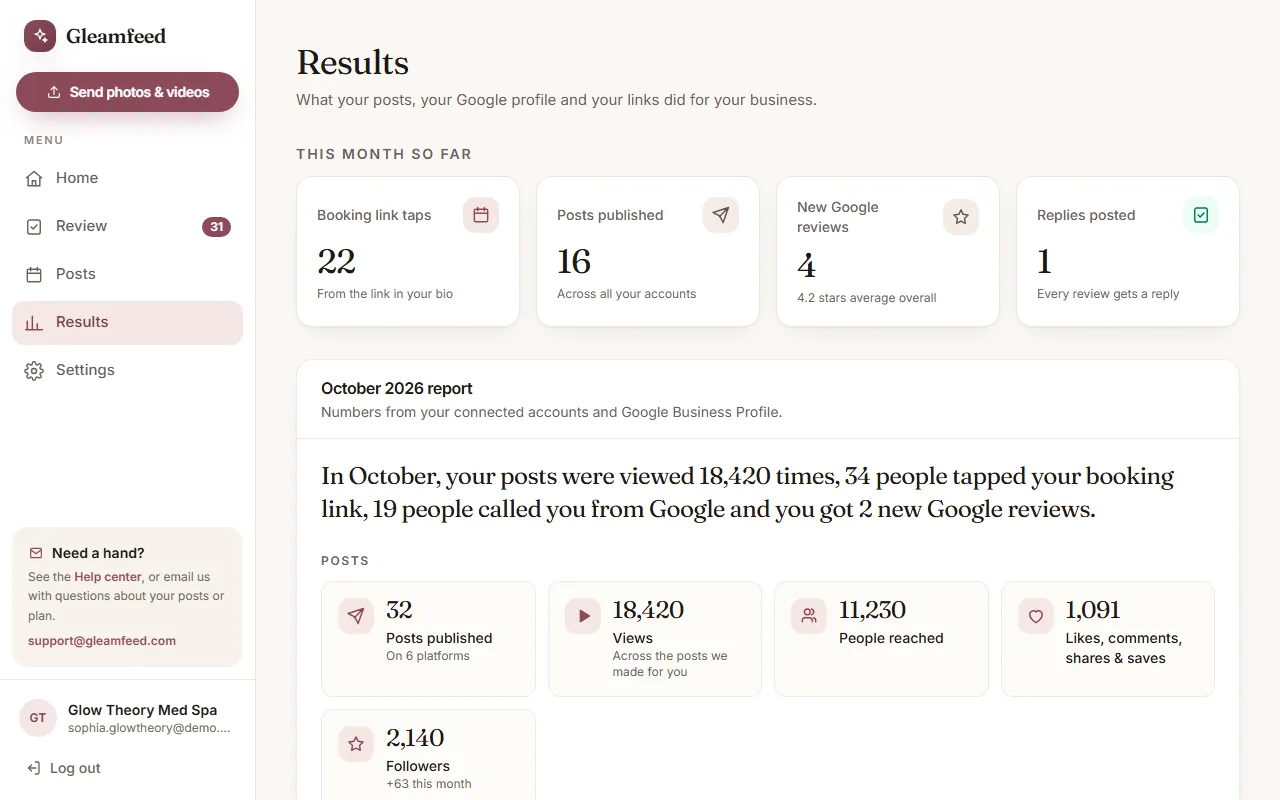
Open Results to see what your posts, your Google profile and your links did for your business.
This month so far
Booking link taps, posts published, new Google reviews and replies posted, updated as the month goes on.
Your monthly report
Early each month we send a short, plain-English report on the month before, and it's saved under Results. It covers your posts (views, people reached, likes, comments, shares and saves, followers), bookings and Google (link taps, calls, website clicks, direction requests, times you showed up on Google) and reviews. The numbers come from your connected accounts and Google Business Profile; anything a platform doesn't share is left out. We report what happened; we don't promise specific results.
Your tracked booking link
Put this link in your Instagram and TikTok bio. It opens your booking page and lets us count how many people tap it: once per person per day, without storing anyone's IP address. Set or change where it goes under Settings → Social accounts.
Ask for Google reviews with a QR code
- In your Google Business Profile, tap Ask for reviews (or Get more reviews) and copy the link.
- Paste it into Your Google review link under Results and click Save link.
- Print a counter card for your front desk, Download QR, or copy the link to text clients after their visit.
Good to know
Your tracked link and QR code turn on once your plan is active.
Still have a question?
Email us and a real person will help.